




Navigation
Available for SharePoint Online
 SharePoint On-Premises
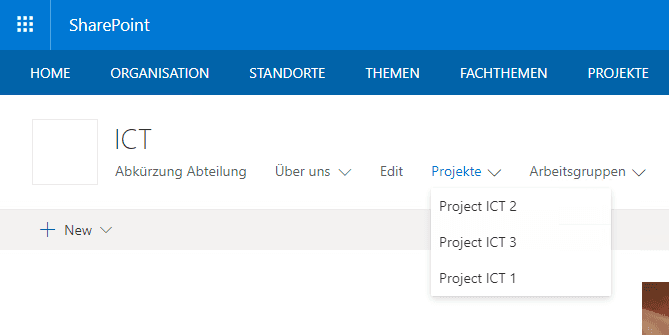
SharePoint OnlineSharePoint On-PremisesUnlike SharePoint Online, SharePoint Server Subscription Edition has no hub sites that provide a global navigation. Yet such a navigation is essential for use cases such as intranet solutions. Our Enterprise Navigation complements the platform’s existing navigation options with a central, consistent approach.
- Flexible to deploy:
- Add the navigation to every SharePoint site where it is needed.
- Centrally configurable:
- Fill in the navigation in a centrally stored configuration file.
- Mobile:
- Use the navigation for a seamless solution on mobile devices too.
- Global and local:
- Configure a global and/or a local navigation, as required.
- Different areas:
- Divide the navigation into different areas.
- Corporate design:
- Design the navigation and match its colours to your corporate design.
Global navigation
- Split nodes:
- Display nodes in both the left and the right part of the navigation.
- Special “Search” node:
- Show a people search or a direct search in Bing or Google right in the navigation.
- Highlight nodes visually:
- Assign a different colour to individual nodes to make them stand out.
- Nodes on 3 levels:
- Create a navigation with up to 3 levels.
- Flexible design:
- Choose the look of the navigation and match it to your corporate design.
Local navigation
- Varies by site type:
- Show different nodes in the local navigation depending on the defined site type.
- Dynamic, based on a search query:
- The links are displayed dynamically based on the search.
Contact us
We look forward to learning about your requirements and presenting our solutions to you. Feel free to contact us to arrange a meeting.
- Address
- Spittel 5
3953 Leuk-Stadt - Phone
- +41 76 393 79 00
- info@softforge.ch