




Migration Cockpit
 Microsoft Teams
 SharePoint Online
 SharePoint On-Premises
Welcome to our innovative Migration Cockpit – your central solution for a smooth and efficient migration from SharePoint on-premises to SharePoint Online. Our Migration Cockpit not only provides a detailed inventory of your data, it also lets you control migration processes transparently and flexibly. From decision-making and execution through to quality control, you keep track at all times and benefit from efficient load balancing. Experience a new dimension of data migration that takes the pressure off your IT department and gives you maximum control and flexibility. Discover the benefits of our Migration Cockpit and start your successful future with SharePoint Online today!
- Detailed data inventory:
- A comprehensive, always up-to-date inventory of the data with key figures serves as the basis for migration decisions.
- Decentralised decision-making and scheduling:
- Data owners decide what happens to the data (archive, migrate, delete) and determine the right time to do it.
- Quality control after migration:
- Reports and logs allow you to check efficiently whether all data has been migrated completely and as intended.
- Real-time progress monitoring:
- The cockpit lets the business unit monitor migration progress in real time at any moment.
- Cross-departmental progress tracking:
- The migration portal provides a consolidated overview of migration progress across all departments.
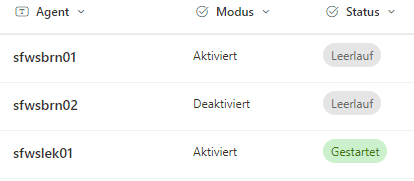
- Efficient load balancing and control:
- Several migration agents can be controlled via the portal to deliver high availability and maximum speed.
Detailed data inventory
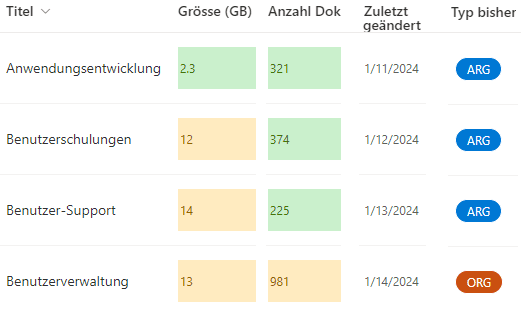
- Inventory:
- An always up-to-date inventory with key figures such as size, number of documents, lists, permissions, last update, etc. serves as the basis for the migration decision. This lets data owners determine exactly which data should be migrated, archived or deleted.
Decentralised decision-making and scheduling
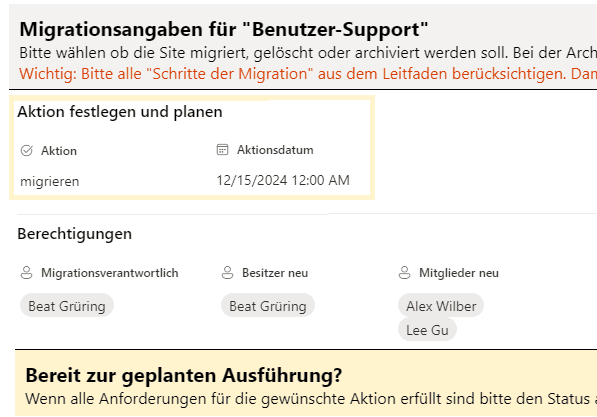
- Decisions:
- Data owners and business units are in control of what happens to the data and can set the time of the migration. Whether migrating, archiving or deleting – each data owner makes their decision autonomously and flexibly.
Quality control after migration
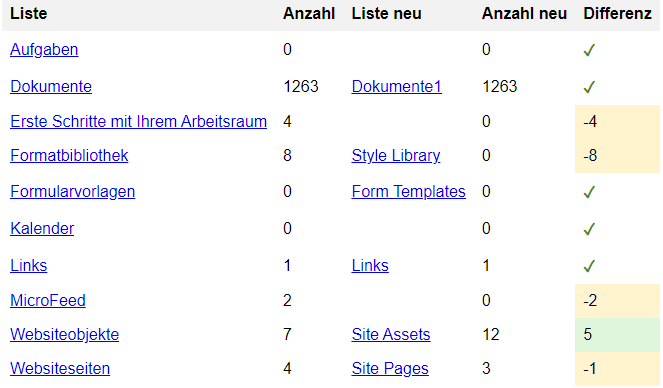
- Quality control:
- Once the migration is complete, the Migration Cockpit delivers a quality control report. It enables a quick and easy check of the completeness of the migrated data. The links in the report let you compare source and target directly.
Real-time progress monitoring
- Progress monitoring:
- Through the cockpit, the business unit can view the progress of the migration at any time. This creates transparency and enables proactive control of the migration process.
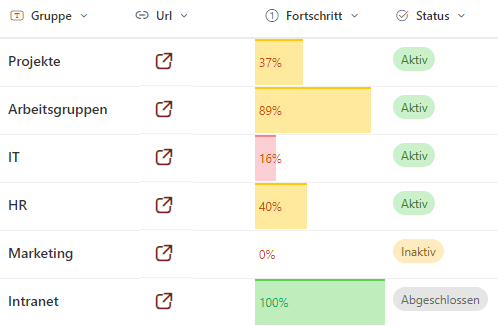
Cross-departmental progress tracking
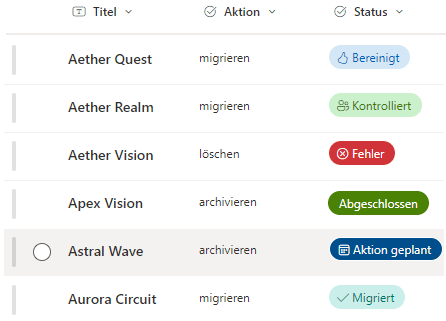
- Efficient collaboration:
- The migration portal lets you track the progress of the migration across different departments and units. This keeps everyone involved informed at all times and enables efficient collaboration.
Efficient load balancing and control
- Efficiency:
- To optimise the migration, several migration agents can be controlled via the migration portal. Distributing the work across several agents increases availability and throughput, enabling an efficient and fast migration even for large volumes.
Contact us
We look forward to learning about your requirements and presenting our solutions to you. Feel free to contact us to arrange a meeting.
- Address
- Spittel 5
3953 Leuk-Stadt - Phone
- +41 76 393 79 00
- info@softforge.ch