




Read Confirmation for Documents
Available for Microsoft Teams
 SharePoint Online
 SharePoint On-Premises
Microsoft TeamsSharePoint OnlineSharePoint On-PremisesOur Read Confirmation solution gives your employees a simple way to confirm that they have read documents. In addition, you can define reading groups that automatically identify the documents certain employees need to read and flag them as required reading.
Read Confirmation features
From simply confirming documents directly in the library to defining detailed reading groups made up of documents and employees — this is what our Read Confirmation offers:
- Simple read confirmation of documents:
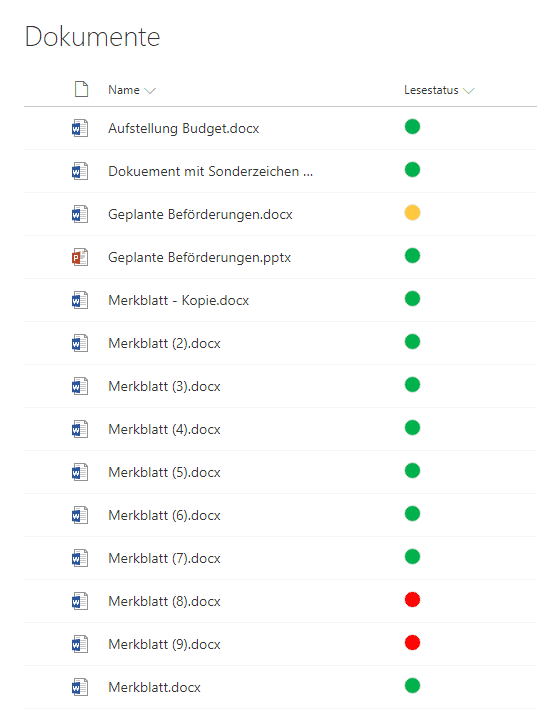
- Read Confirmation is integrated directly into SharePoint document libraries. A simple traffic-light system shows you the status of the documents at a glance.
- Version changes under control:
- As soon as a new version of a document is created, you can define whether the new version needs to be read again or is unchanged in substance and therefore does not need to be confirmed again.
- My documents to read:
- A dedicated web part gathers from across the entire platform only those documents that the respective employee needs to read.
- Reading groups:
- Create reading groups made up of documents and employees based on specific criteria. Reading tasks are created automatically for this set.
- Reports:
- Monitor the progress of read confirmations — from the reading rate of the defined reading groups down to the individual documents and employees they contain.
- Scalability:
- The architecture of Read Confirmation also supports large numbers of documents. Several thousand documents with many versions can be confirmed by thousands of employees.
Fast & intuitive
Active and passive read confirmation
- Active read confirmation:
- Your employees can confirm any document as read directly in the document library. Documents that have been read and whose version is still current are marked with a green light.
- New versions changed in substance?
- Not every new version of a document has to be confirmed as read again straight away. Mark documents as unchanged in substance and the read confirmation remains valid.
- Passive read confirmation:
- Create reading groups to define documents that must be read. These are marked with a red light for the employees included in the corresponding reading group.
Define documents to be read
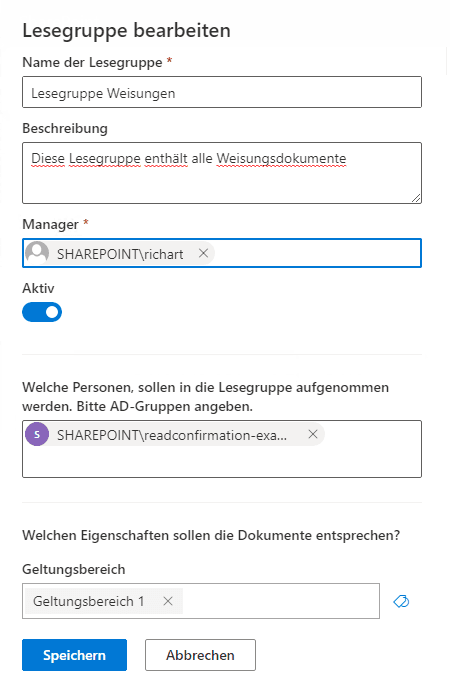
Defining reading groups
- Mark documents as required reading:
- Filter and find documents based on their metadata. Direct search and display of the matching documents helps you identify the right ones. Save this metadata in a reading group.
- Employees via AD groups:
- For each reading group, you can specify one or more AD groups whose members are then added to the reading group. The defined documents are shown as required reading for these employees.
- Always up to date:
- Read Confirmation automatically checks for added or deleted items within the reading group. When new documents with this metadata are uploaded, they are automatically added to the reading group.
Your employees’ personal view:
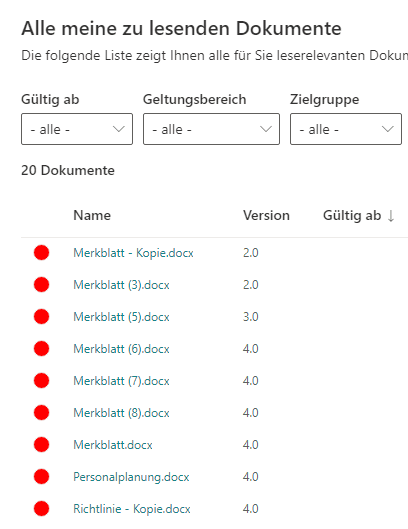
My documents to read
- A dedicated web part for your employees:
- A special web part shows the documents the signed-in user needs to read. Place this web part prominently on the home page or in the employee’s personal area.
- Confirm with one click:
- Employees see at a glance all the documents they need to confirm as read, as well as the date on which each document comes into effect.
- Detailed filtering:
- Employees can open a detailed view and sort and filter their open read confirmations. They can also display the documents they have already confirmed.
FAQ
Frequently asked questions
- How can we make sure that important documents such as directives or safety instructions have really been read by all employees?
- Many companies still solve this problem with e-mail confirmations or paper lists — time-consuming, hard to evaluate and hardly audit-proof. SoftForge Read Confirmation integrates directly into your SharePoint document libraries: employees confirm that they have read a document with one click, and HR and compliance receive a complete, auditable evaluation — without additional tools and without additional training effort.
- Why is SoftForge Read Confirmation particularly suitable for Swiss companies?
- Read Confirmation was developed for the Swiss market — based on the requirements of the Swiss Federal Act on Data Protection (FADP) and the GDPR. All data remains in your own Microsoft 365 tenant; no data is transferred to external servers. For years, SoftForge has been a trusted partner of Swiss enterprise customers in healthcare, education and industry.
- How long does it take to introduce Read Confirmation in our company?
- SoftForge delivers Read Confirmation in days, not months — integrated directly into your existing SharePoint environment. No complex roll-out project, no new software platform. SoftForge supports you as a partner from the first conversation to go-live and beyond.
- Which industries and compliance requirements is Read Confirmation designed for?
- Read Confirmation is particularly relevant for regulated industries: healthcare and pharma (patient instructions, GMP documentation), banks and insurers (compliance guidelines), public administration and HR departments (staff regulations, safety instructions). It provides legally compliant documentation of acknowledgement in accordance with Swiss and European data protection requirements.
- Does Read Confirmation also work with SharePoint on-premises?
- Yes. SoftForge Read Confirmation supports SharePoint Online (Microsoft 365) and SharePoint on-premises (SharePoint Server Subscription Edition). This deep SharePoint expertise — including in hybrid and older environments — is a key advantage of SoftForge over providers that offer cloud-native solutions only.
01
02
03
04
05
Contact us
We look forward to learning about your requirements and presenting our solutions to you. Feel free to contact us to arrange a meeting.
- Address
- Spittel 5
3953 Leuk-Stadt - Phone
- +41 76 393 79 00
- info@softforge.ch