




Kanban Web Part
The “Kanban for SharePoint” lets you display the content of existing SharePoint lists as an individual Kanban board. You can use any list as the source for the Kanban. Several Kanbans can be configured on the same list, so you can create different views such as “Tasks per release” or “My tasks by status” on the basis of the same list.
Available for SharePoint Online
 SharePoint On-Premises
SharePoint OnlineSharePoint On-Premises- Display any list as a Kanban:
- Display any SharePoint list as a Kanban board on a SharePoint page.
- Several Kanbans on the same list:
- Display several Kanbans with the same list source on the same SharePoint page.
- Search and filter:
- Search and filter the list directly in the Kanban view to find specific items faster.
- Intuitive:
- Create, edit or move list items via drag and drop, conveniently and directly from the Kanban.
- Clear overview:
- Use the full potential of Kanban by tailoring colours, card content and styles exactly to your needs.
- Microsoft 365 and SharePoint integration:
- Thanks to the Kanban’s full compatibility, you benefit from all the advantages of the platform.
Clear
Lists displayed the way you want
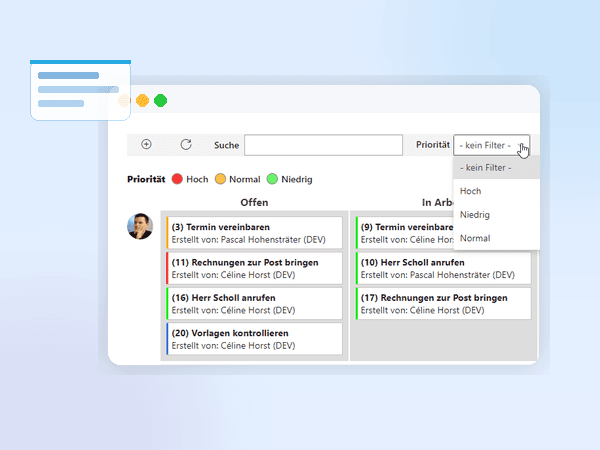
- Define the card content:
- Freely configure which information is visible on the cards.
- Filter items by field:
- Show a filter and define which field it filters by.
- Search:
- Use full-text search to filter for any content and find the relevant card instantly.
- Legend:
- Mark the cards with a legend in any colours and display the legend.
- Flexible display:
- Configure the fields to display in HTML and refine them with CSS.
Simple
Intuitive to use
- New items:
- Simply add new items.
- Edit items:
- Edit items directly from the Kanban view.
- Drag and drop:
- Simply move items via drag and drop.
- All details:
- Click on an item to view and edit all of its details.
Contact us
We look forward to learning about your requirements and presenting our solutions to you. Feel free to contact us to arrange a meeting.
- Address
- Spittel 5
3953 Leuk-Stadt - Phone
- +41 76 393 79 00
- info@softforge.ch