




SoftForge Cockpit - Governance & Provisioning
SoftForge Cockpit is the provisioning engine for your organisation. With SoftForge Cockpit, your employees can request groups themselves — in a controlled way. On top of that, MS Teams, Viva Engage and SharePoint groups are displayed compactly and clearly in one central dashboard. With SoftForge Cockpit, the clutter, the endless searching for teams, groups or SharePoint sites and the constant jumping back and forth between Teams, chat and documents are a thing of the past.
 Microsoft Teams
 SharePoint Online
 SharePoint On-Premises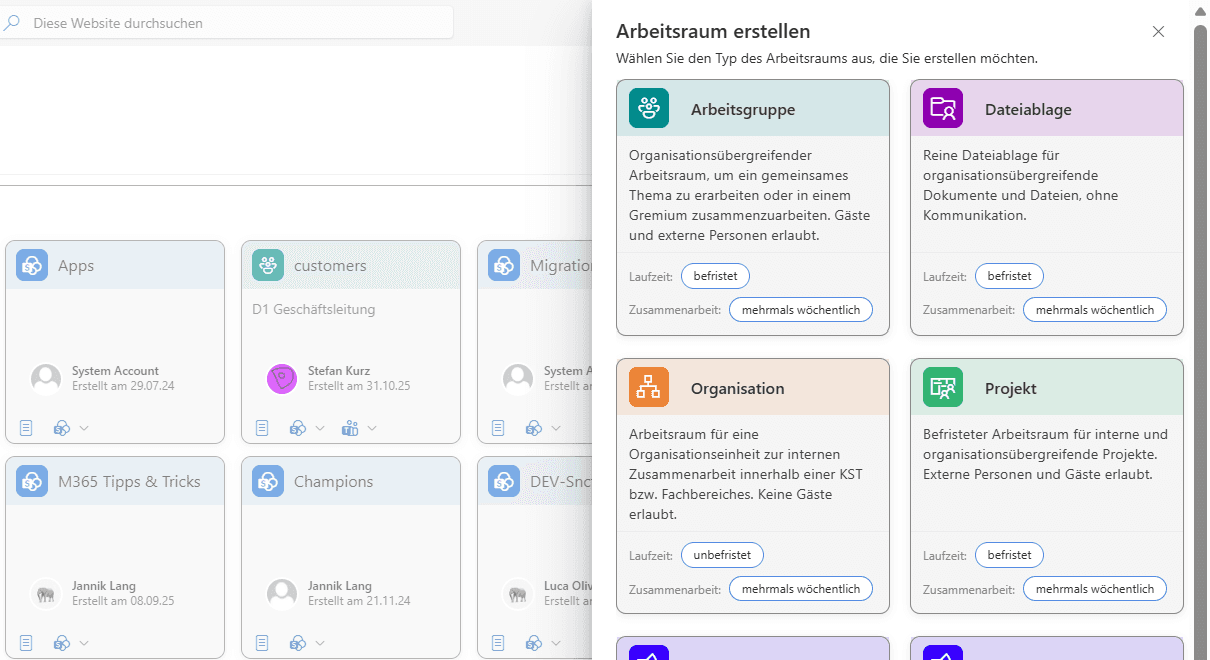
Sprawl in Microsoft 365
With every new team, every SharePoint site and every Viva Engage group, the Microsoft 365 environment becomes harder to keep track of. Employees spend ages looking for the right workspace, while IT drowns in manual provisioning requests. Without naming conventions and governance, this leads to security risks and compliance issues.
Central management and self-service
SoftForge Cockpit brings provisioning and navigation together in one place. Authorised users request their groups themselves, while IT keeps full control through approvals and governance policies. All Teams, SharePoint and Viva Engage groups come together in one searchable overview.
Self-service portal:
Let your users request new groups directly through SoftForge Cockpit.
Provisioning:
Provision approved teams, SharePoint sites and Viva Engage groups automatically.
Overview:
Benefit from a clear overview of your teams and the SharePoint sites that have been created.
Templates:
Define which types of groups or sites can be created.
Central launch point:
Jump straight from SoftForge Cockpit into a team, a channel or a folder.
Permissions:
Control access to your teams and SharePoint sites directly from SoftForge Cockpit.
Business benefits at a glance
By implementing SoftForge Cockpit, you gain numerous advantages that have a direct impact on your business results:
Time savings and greater efficiency
Your employees no longer have to switch back and forth between different Microsoft 365 applications to find the right group. All information is available centrally, saving valuable working time every day.
Governance and compliance
Predefined templates and naming conventions ensure that all groups and sites are created to consistent standards. This not only simplifies administration, but also improves compliance with internal policies and external requirements.
Scalability
As your organisation grows and new teams are added, SoftForge Cockpit scales with it effortlessly. Thanks to the automated provisioning process, your IT department’s workload does not grow in proportion to the number of teams.
A better user experience
The intuitive user interface of SoftForge Cockpit makes it easy to request new groups and to find and manage existing ones. Integration into your existing Microsoft 365 environment ensures a seamless working experience.
Every feature in detail
From self-service requests to template management — use the navigation on the left to jump straight to the topic that interests you.
Self-service
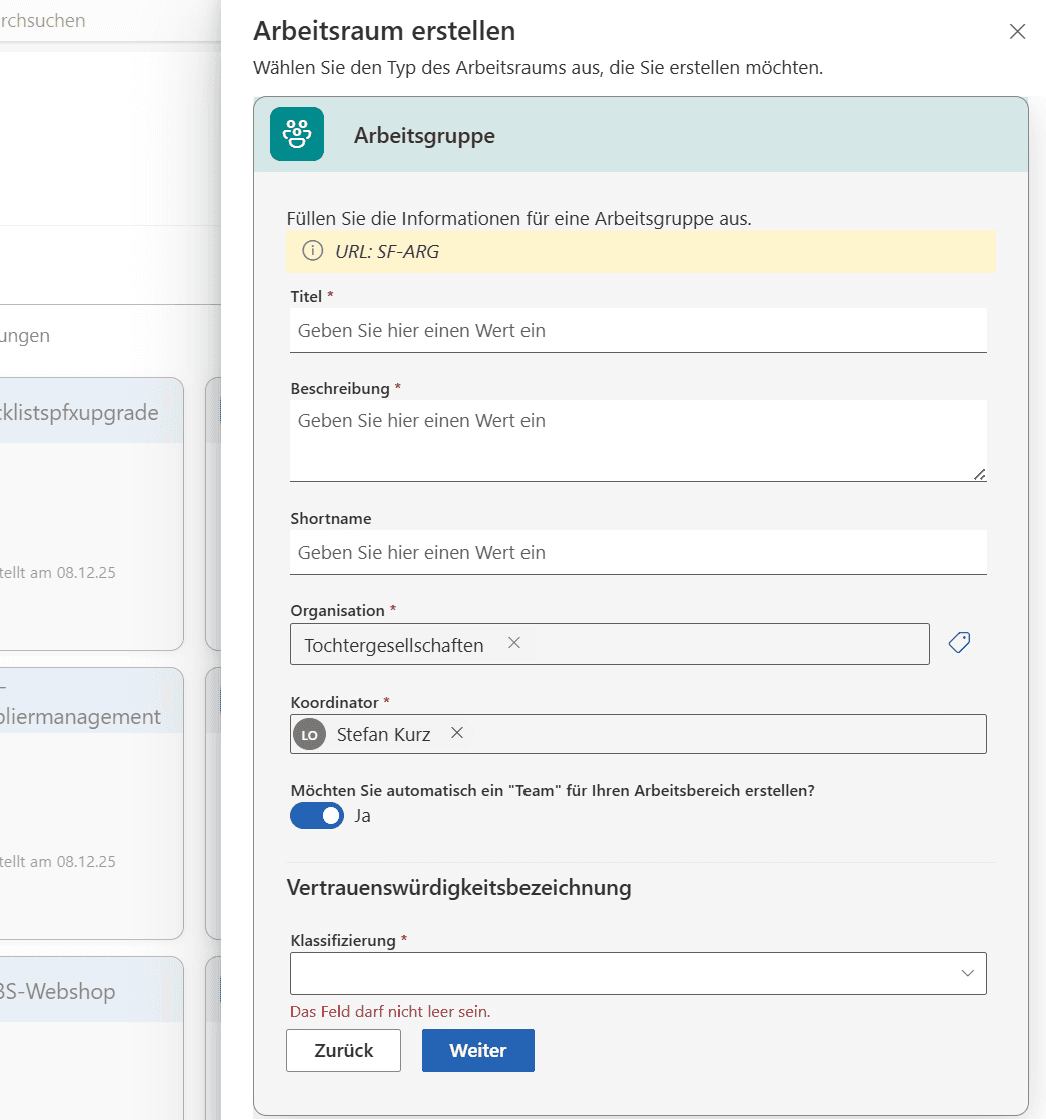
Creating groups made easy
- Request groups
- Let selected users order their groups through SoftForge Cockpit.
- Templates
- Provide your users with a selection of templates.
- Naming conventions
- Define naming conventions that flow directly into the SharePoint URL.
- Organisation and coordinator
- Have requests assigned directly to an organisational unit and a coordinator where needed.
- Approval
- Review requests through an approval process.
Central launch point
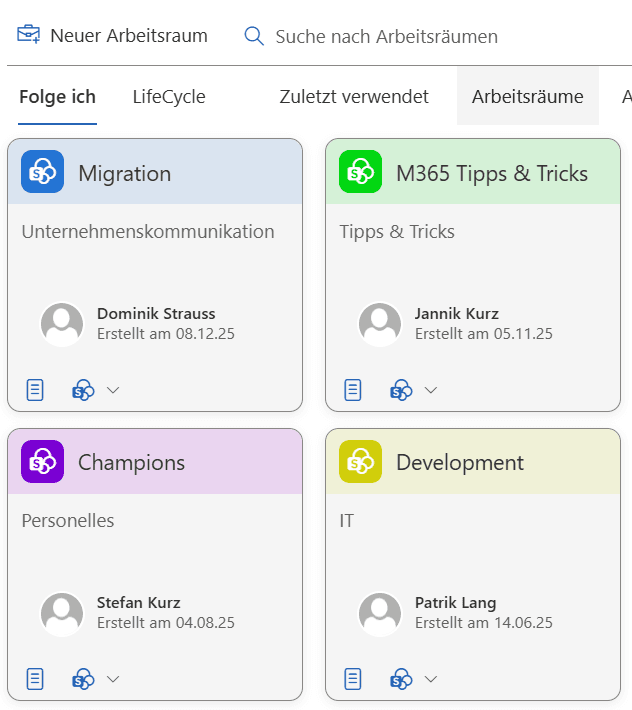
Bringing clarity to Teams
- Overview
- Find the groups you have access to directly in SoftForge Cockpit.
- Favourites
- Mark the groups you use frequently as favourites.
- Launch
- Navigate directly from SoftForge Cockpit to a Teams channel, the SharePoint site or a folder within the site.
- Permissions
- View and manage permissions directly from SoftForge Cockpit.
- Information
- View and manage group information directly from SoftForge Cockpit.
Templates
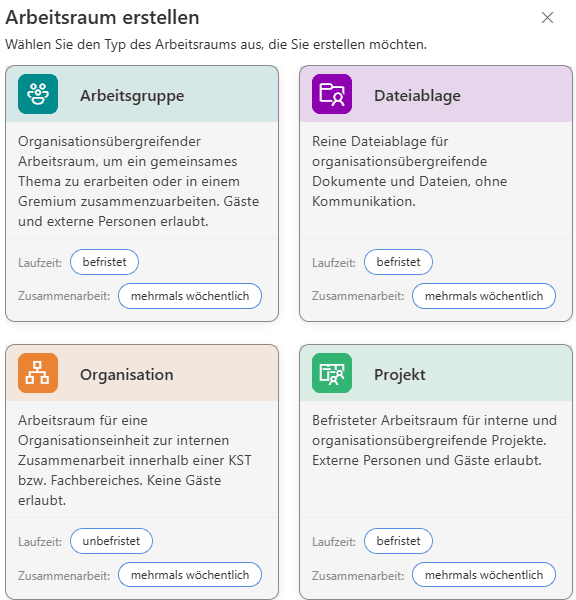
A choice of group templates
- Templates of your choice
- Decide whether you need organisation, project, working group or SharePoint-only templates.
- Properties
- Define template-specific properties such as naming conventions, the URL, whether the group is created with or without Teams, or which colour the group tile should have in SoftForge Cockpit.
- Permissions
- Assign templates to specific user groups to define who sees which templates and can use them to create a group.
Use cases in practice
SoftForge Cockpit is ideally suited to a wide range of scenarios and organisations of every size. Typical use cases include:
Project management teams
Rapid creation of project groups from standardised templates, with automatic provisioning of the required SharePoint document libraries and Teams channels for structured project work.
Organisational units
Departments can request working groups on their own, while the IT department defines and monitors governance policies and naming conventions centrally.
External collaboration
Thanks to the approval process, teams with external partners or customers can also be set up securely, with full traceability and control.
Compliance and audit
All group requests and approvals are documented, which is essential for audits and compliance reviews. You always have a complete overview of all provisioning activities.
Knowledge transfer
Thanks to the central overview, new employees find relevant projects and working groups faster, which speeds up onboarding considerably.
Integration into your existing infrastructure
SoftForge Cockpit integrates seamlessly into your existing Microsoft 365 environment. It works with both SharePoint Online and SharePoint On-Premises, so you stay flexible regardless of which variant you use or whether you run a hybrid solution. Integration with Microsoft Teams means your employees do not have to learn any additional tools – they keep working in the familiar Microsoft 365 environment while benefiting from the extended management and navigation capabilities of SoftForge Cockpit.
The solution uses proven Microsoft 365 APIs and services, ensuring the highest level of security and reliability. All data remains in your existing Microsoft 365 environment; no additional storage locations or third-party services are required. This simplifies not only implementation, but also maintenance and support.
Security and permission management
Security is the top priority for SoftForge Cockpit. Its fine-grained permission system lets you control precisely who can perform which actions. Administrators can define which users may request new groups, who can grant approvals and who may access the management functions.
Permission management works in both directions: you can manage permissions not only in SoftForge Cockpit, but also adjust them directly in Microsoft Teams and SharePoint sites. This central management reduces errors and ensures that permissions are granted consistently and traceably.
Technical highlights
SoftForge Cockpit was developed by SoftForge AG, a leading provider of Microsoft 365 solutions, and is continuously being enhanced. The solution is based on modern web technologies and offers a responsive user interface that works perfectly on every device – from desktop computers to tablets and smartphones.
The architecture of SoftForge Cockpit is designed to perform well even in large organisations with thousands of teams and sites. Intelligent caching mechanisms and optimised queries ensure that the overview remains fast and responsive, even in extensive environments.
FAQ
Frequently asked questions
- Our Teams and SharePoint structure has grown out of control — nobody has an overview any more. What can we do?
- Uncontrolled growth in Microsoft 365 is widespread in enterprises: teams without naming conventions, SharePoint sites without structure, IT departments swamped with manual provisioning requests. SoftForge Cockpit restores order: a central dashboard through which all teams, SharePoint sites and Viva Engage groups are managed clearly — with governance rules, templates and permissions that you define yourself.
- What exactly does SoftForge Cockpit do for our IT department?
- SoftForge Cockpit relieves your IT through controlled self-service: employees request new groups directly in SoftForge Cockpit, and IT approves them according to defined rules and templates. At the same time, IT managers get a complete overview of all workspaces — with direct access to Teams, SharePoint or Viva Engage. Less manual work, more control, better governance.
- What sets SoftForge Cockpit apart from other Microsoft 365 governance tools?
- SoftForge Cockpit was not designed on the drawing board, but developed from real challenges in enterprise environments. SoftForge has deep SharePoint expertise — cloud and on-premises — and delivers in days, not months. You do not get a software vendor, but an experienced partner with short decision-making paths and personal commitment.
- Does SoftForge Cockpit also work in a hybrid Microsoft 365 environment?
- Yes. SoftForge Cockpit supports both SharePoint Online and SharePoint On-Premises — a deliberate advantage over providers that offer cloud-only solutions. SoftForge supports you wherever you stand today and wherever your IT strategy is heading.
- How does SoftForge Cockpit support our compliance and audit requirements?
- Every group request, every approval and every provisioning step is documented in SoftForge Cockpit and is fully traceable. Naming conventions and templates are enforced centrally, and permissions are granted consistently. For audits, you always have a complete overview — even in environments with thousands of teams and sites.
Contact us
We look forward to learning about your requirements and presenting our solutions to you. Feel free to contact us to arrange a meeting.
- Address
- Spittel 5
3953 Leuk-Stadt - Phone
- +41 76 393 79 00
- info@softforge.ch