




Recruitment tracking with the SoftForge Kanban board
With the SoftForge Kanban board, you can use the flexibility of any SharePoint list and manage tasks in the efficient and effective Kanban board view.
With Microsoft Lists, Microsoft offers a modern type of list and matching list templates for use cases such as recruitment tracking. The template provides the following fields:
- Name of the candidate
- Position the candidate is applying for
- Status of the hiring process
- Recruiter (person who manages the scheduling of the interviews)
- Date the application was submitted
- Date of the phone interview with the candidate
- Person conducting the phone interview with the candidate
- Interview date
- Interviewer
- Notes
- Link to the LinkedIn profile
- Attachment for the CV
We can conveniently use this list as a basis. With the SoftForge Kanban board, you can now generate as many boards as you like for the recruitment tracker. For example, put together a simple overview of all applications for the advertised positions and show at the same time who is responsible for the applications and candidates:
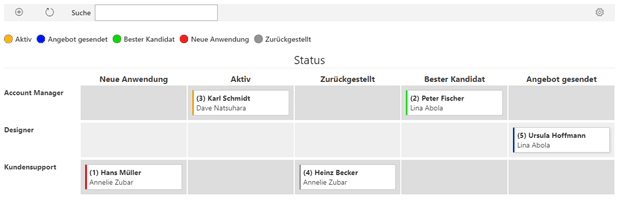
Or set up another Kanban board tailored to your employees so they always keep track of all their candidates:
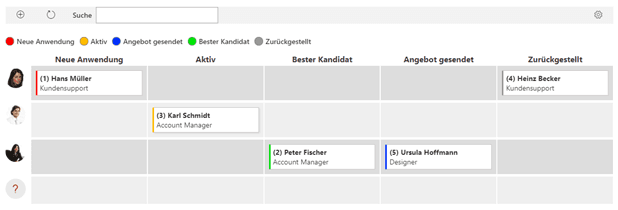
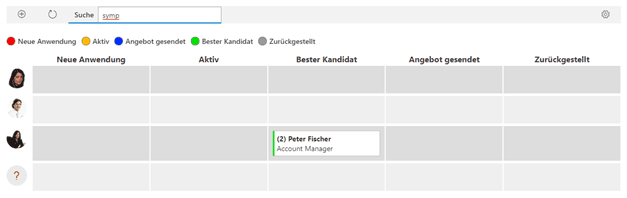
Lost track of all the candidates? Which candidate did your employees particularly like again? Simply search with the full-text search directly in the Kanban board:
Kanban in Teams
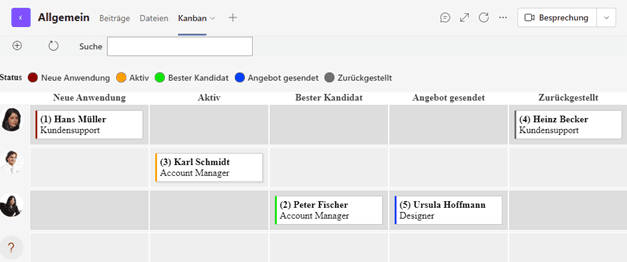
Thanks to the Teams integration, the Kanban can also be conveniently embedded and used in the relevant channels.
Why not just use Planner?
Specific tasks are hard to map in Planner, because the task fields cannot be customised. The big advantage of the SoftForge Kanban lies in the free use of fields on SharePoint lists, which can be prepared and used depending on the use case. While in Planner you are bound to the task management fields provided by Microsoft 365, the SoftForge Kanban board lets you use exactly the fields that matter to you. It makes no difference whether you edit the data in the list view or via the SoftForge Kanban board. You can also use the SoftForge Kanban board independently of the Microsoft cloud in your on‑premises SharePoint environment.